Popular Posts

Showing posts with label video edit softwares. Show all posts

Tuesday, August 9, 2016

Cyberlink PowerDirector 13.0 Multilang Retail Activated (517 Mb)


ကိုယ္ပိုင္ ဗီဒီယိုမ်ား ဖန္တီးျခင္း၊ဗီဒီယိုဖိုင္မ်ားကို တည္းျဖတ္ျပဳျပင္ျခင္းတို႔ကို လုပ္နိုင္တဲ့
Cyberlink PowerDirector ကို တင္ေပးလိုက္ပါတယ္။Version 13 ျဖစ္ပါတယ္။ကီးမလို
ဘဲ အင္စေတာျပီးတာနဲ႔ အသင့္သံုးနိုင္တဲ့ Activated Version တခုပါ။
အင္စေတာ လုပ္နည္း.....
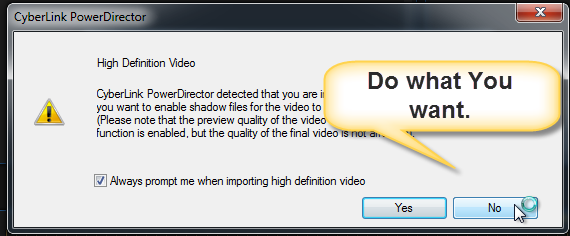
အင္စေတာလုပ္ပံုကို ေအာက္ကပံုမ်ားအတိုင္းၾကည့္ျပီး အင္စေတာ လုပ္ပါ။




                       Password - www.linthit.com

                                Download   

ဗီဒီယို တည္းျဖတ္ ေဆာ့ဝဲ Adobe Premiere Pro CS5.5 v5.5.0 (1.45 Gb)


Adobe ကထုတ္တဲ့ နာမည္ၾကီး ေဆာ့ဝဲတခုျဖစ္တဲ့ ဗိဒီယုိ တည္းျဖတ္ေဆာ့ဝဲ Adobe
Premiere Pro CS5.5 v5.5.0 ကို တင္ေပးလိုက္ပါတယ္။
ဖိုင္ဆိုဒ္က (1.45 Gb) ျဖစ္လို႔ RAR ဖိုင္(၅) ဖိုင္ခြဲျပီး တင္ထားေပးပါတယ္။C-box က
ေတာင္းဆိုထားသူေရာ အျခားလိုခ်င္သူေတြပါ ေဒါင္းလုပ္ အဆင္ေျပေစဘို႔ ဖိုင္ခြဲျပီး
တင္ေပးလိုက္တာပါ။
RAR ဖိုင္ (၅) ဖိုင္လံုးကို ေဒါင္းလုပ္ျပီး WinRAR နဲ႔ Extract ျပန္လုပ္ပါ။
Adobe Premiere Pro CS5.5 v5.5.0.exe ဖိုင္တဖိုင္ထဲ ျပန္ရပါမယ္။
အဲဒီဖိုင္ကို run (or) extract လုပ္ပါ။
ရလာတဲ့ ဖိုင္ေတြထဲက ဘယ္လို အင္စေတာလုပ္ရမယ္ ဆိုတာ Text ဖိုင္ကို ဖတ္ျပီး
အင္စေတာလုပ္ယူပါ။
Part 1   Download
Part 2   Download
Part 3   Download
Part 4   Download
Part 5   Download

Sunday, March 9, 2014

ဗီဒီယို တည္းျဖတ္ အေခြထုတ္ခ်င္သူ အတြက္ Cyberlink Power Director - 12

Cyberlink Power Director - 12


နမူနာစမ္းသံုးၾကည့္တာပါ အေတာ္ေလးအဆင္ေျပတယ္ မယူခင္ ၾကည့္ၾကည့္ လိုက္ပါ

ဗီဒီယို တည္းျဖတ္တာ  ၀ါသနာပါသူေတြအတြက္  ေလ့လာသင့္တဲ့ ေဆာ့၀ဲတစ္ခုကို

မွ်ေ၀ခ်င္ပါတယ္ ။ အေျခခံ၀ါသနာရွင္ကေန ပညာရွင္ျဖစ္သည္အထိ အသံုးျပဳေနတဲ့

ေဆာ့၀ဲေကာင္းတစ္ခု ျဖစ္ပါတယ္။ လက္ရွိ ဗီဒီယိုထုတ္လုပ္ျဖန္ ့ခ်ီေရးေတြမွာလည္း

သံုးေနၾကဆဲပါ ရိုက္ကူးလိုက္တဲ့ ဗီဒီယိုဖိုင္ေတြကို တည္းျဖတ္ အေခြထုတ္ဖို ့ အဆင္

ေျပေစႏိုင္တဲ့ ေဆာ့၀ဲေကာင္းေလးပါ သံုးတတ္ရင္ သံုးတတ္သလို ဖန္တီးလို ့ရတယ္


Ulead ထက္ သံုးရတာ ပိုလြယ္သလိုပဲ  ။ version အသစ္ေတြ 12အထိ ထြက္ေနၿပီ

ေကာင္းမေကာင္း ကလည္း ေဇာက္ခ်သံုးၾကည့္ခ်ိန္မရွိဘူး ။ ေလ့လာရံု စမ္းၾကည့္ရံုပဲ

Download - Cyberlink Power Director - 12

Setup ကို အင္စေတာလုပ္ပါ။
ေဆာ့ဝဲကို မဖြင့္ပါနဲ႔။
Crack ဖိုင္(၄)ဖိုင္ကို C\Program Files\CyberLink PowerDirector\ မွာ copy
and paste လုပ္ပါ။
အဲဒီ(၄)ဖိုင္ထဲက 12 ဆိုတဲ့ဖိုင္ေလးကို run လိုက္ျပီး Ok ကုိကလစ္ေပးပါ။
Windows 7(32/64) and Windows 8(32/64) Only***

ေဆာ့၀ဲ Credit to-   http://www.linthit.com


အသံုးအမ်ားဆံုး ဗီဒီယိုတည္းျဖတ္ျခင္း ေဆာ့၀ဲ မ်ားပါ ေအာက္ပါအတိုင္း ျဖစ္ပါသည္

Thursday, October 31, 2013

CyberLink PhotoDirector 4.0.3306 full version free down load

CyberLink PhotoDirector 4.0.3306


Cyberlink company presents to the public of their new product called CyberLink PhotoDirector 4.0.3306. CyberLink PhotoDirector 4.0.3306 is used to enhance the image or photo. The developers promise that the software is aimed at photographers and photo enthusiasts can turn ordinary photos into extraordinary photos. CyberLink PhotoDirector 4.0.3306 supports RAW files from Canon and Nikon cameras and explore the vast potential of creativity that you have. Fotografer serious about their hobby do it all with CyberLink PhotoDirector 4.0.3306.

CyberLink PhotoDirector 4.0.3306 is the solution to make your photos look more professional. From time to import a photo, you will be spoiled by the new and unique features that make your work look professional. Perfect portrait and scenery transforms to your desire. I just give you the chance to try CyberLink PhotoDirector 4.0.3306 and if you like this software I recommend that you purchase CyberLink PhotoDirector 4.0.3306 and support its developer.
Info
What's New in PhotoDirector 4?
PhotoDirector 4 delivers new and unique tools to create professional looking photos. Achieve high range imaging effect and accurately remove objects with our powerful algorithm. Our popular people beautifier now includes the body shaper for that stunning portraits. Managing and retrieving photos are effortless with new face tagging feature. Start exploring PhotoDirector and discover the new features for every step of your workflow!

NEW! HDR Effect
Turn high contrast scenes into HDR images. Stylize your visual effects with Glow and Edge adjustments to create dramatic masterpieces.

IMPROVED! Tone Adjustment
More flexibility to control tone and tinge fast and precisely. Achieve the exact look and feel you want for your photo

IMPROVED! White Balance
Regulate temperature and tint to remove unwanted color casts or create visuals to set a certain mood or artistic effects to your photos.

Level and Curve
Add punch to your photos by applying Level and Curve adjustments to the overall image or to specific areas only.

NEW! Chromatic Aberration
Correct unnecessary fringes of color along boundaries of the subjects to further bestow life and accuracy in your photos.

IMPROVED! Spot Remover
Effectively remove noticeable dust spots, blemish or discoloration in a photo with the heal and clone tools.

NEW! Body Shaper
This unique feature is the latest addition to People Beautifier Tools. It contours body figure for that even flawless look in your portraits.

NEW! Protect Brush
The Distortion tool includes a protective brush that lets you reshape only the parts you want to adjust in your portrait photos.

ScreenShoot

How To Download
1. Click on the download links above
2. Wait for few seconds and then click on

Magix Movie Edit Pro 17 Plus HD - Full Version

Magix Movie Edit Pro 17 Plus HD 


MAGIX Movie Edit Pro 17 Plus
merupakan program editing video 3D pertama di dunia editing. Sekarang anda bisa mengedit video Anda seperti biasa di 2D, namun dengan software ini anda bisa membuat film 3D yang menakjubkan yang bakal memikat semua yng melihat hasilnya, dengan pengalaman dimensi 4 video editing.
Lebih dari 50 fitur baru:
  • Improved performance during video editing
  • Faster loading times for video projects
  • Upload videos directly to Facebook®
  • AVCHD import assistant with preview function
  • Redesigned user interface in modern design
  • Redesigned export assistant with clear selection
  • Video monitor zoom and tracker outside the monitor window
  • Effects masks: Apply video effects to selected areas
  • Optimized memory usage on 64-bit systems
  • Dan banyak lagi yang lainnya
NEW 17!
  • Professional travel route animation
  • Upload videos to YouTube® in Full HD (1080p)
  • Upload videos to Vimeo® in Full HD (1080p)
  • Import videos directly from your iPhone®
  • PC performance check
  • AVCHD discs with animated menus
  • Support for mkv. video files (import)
  • Generate color clips
System requirements
  • For Microsoft® Windows® XP | Vista® | 7
  • For 32-bit and 64-bit systems
Minimum system requirements
  • Intel® Core™ Duo with 1.83 GHz, AMD® Dual-Core with 2.0 GHz
  • 1 GB RAM
  • 1 GB hard disk memory for program installation
  • Multi-channel sound card recommended for Surround sound editing
Download Here :
  1. Download | Setup Magix Movie Edit Pro 17 Plus HD
  2. Download | Patch Magix Movie Edit Pro 17 Plus HD